




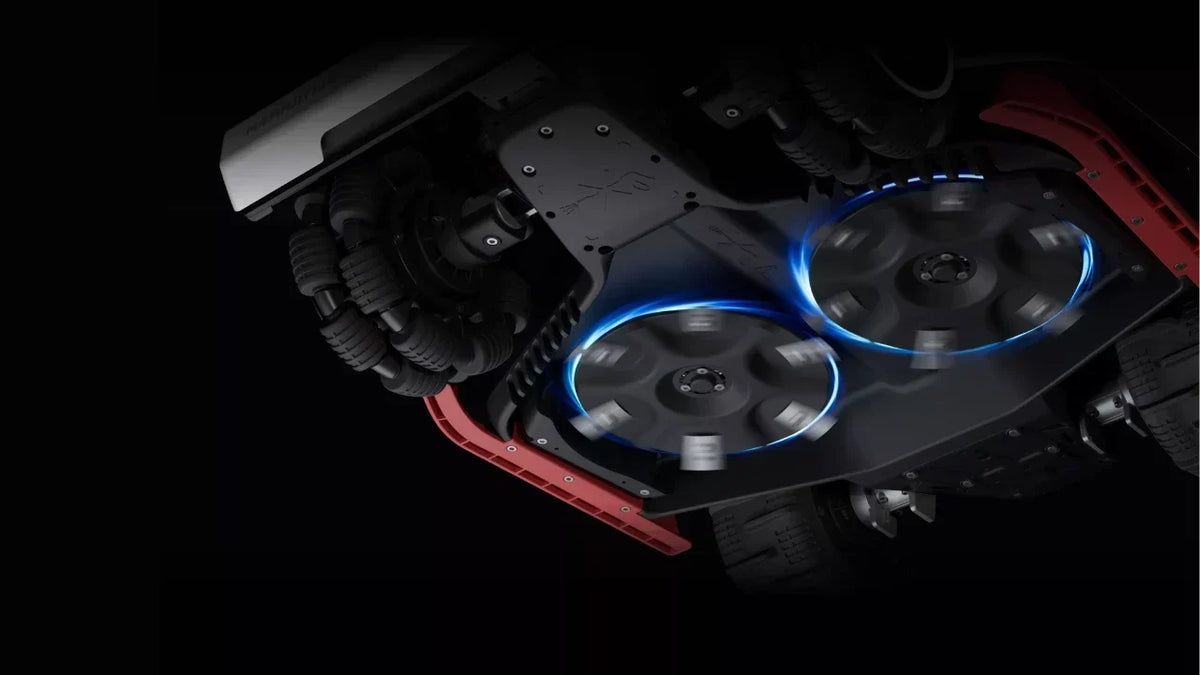
A robotic lawn mower's blades must be kept sharp to cut the grass cleanly and evenly. How often should you replace the blades on a robotic lawn mower? This comprehensive guide provides all the answers you need. You'll also learn how to tell when the blades need replacing and how to do it correctly, so your robotic lawn mower always delivers a perfect, well-kept lawn.
How Often Do Robot Mower Blades Need To Be Replaced?
As a general rule, replace your robotic mower blades every 3 months, or after roughly 150 hours of operation. For thicker lawns, more frequent blade replacement may be necessary. However, this is just a general guideline. The frequency of blade replacement depends primarily on their wear level.
Signs That Your Robotic Lawn Mower Blades Need Replacing
You don't need to stare at the calendar or count weeks. The best way to decide how often to replace the blades on a robotic lawn mower is to learn to recognise the signals from both the lawn and the machine.
If you notice any of the following three signs, it's time to get out the toolbox and replace the blades on your robotic lawn mower.
1. The Tips of the Grass Blades Turn White and Frayed
If your lawn no longer looks deep green and healthy but instead takes on a dull, greyish-white or silvery tone, it can be a sign that the blades on your robotic lawn mower have become dull.
Sharp blades slice cleanly through grass like a razor. Once dull, however, they stop cutting cleanly and begin shredding and tearing the turf instead.
Grass cut with dull blades develops frayed, dried-out tips. After a day or two, the tips split and turn white or light brown.
2. Visual Inspection: Nicks, Build-Up, or Deformation
Check carefully whether the blades show any signs of wear:
- Nicks and damage: Do you see small nicks or visible damage along the cutting edge? This is often caused by contact with stones, toys or other hard objects. Damaged blades produce an uneven cut.
- Dried grass sap and build-up: Sometimes the blades look intact, but the edge is covered in a hard layer of dried grass sap and dirt. This makes the blades thicker and less sharp.
- Bent or cracked blades: If a blade is bent, the entire cutting system can become unbalanced.
Make it a habit to check the underside of your robotic lawn mower once a month. Safety tip: always switch off the robotic lawn mower before touching the cutting disc.
3. Louder Noise and Shorter Mowing Time
A robotic lawn mower should work quietly and discreetly. If you suddenly hear unusual humming, vibrations or a “chewing” sound during mowing, it may indicate that the blades are dull or unbalanced.
Dull blades also create more resistance as they rotate. The cutting motor has to work harder to cut the grass, which drains the battery faster. If you notice that your robotic lawn mower needs charging more often than usual, it may be time to replace the blades.
Which Blades Does Your Robotic Lawn Mower Need?
First and foremost, it's recommended to use original blades for your robotic lawn mower to ensure perfect compatibility with your specific model. For example, if you use a wireless robotic lawn mower from Mammotion, you should choose genuine Mammotion blades as replacements. They are compatible with all models and made from high-quality stainless steel for sharper cuts and better performance.
How to Replace the Blades on Your Robotic Lawn Mower
Here, we will take the LUBA 3 AWD as an example. For blade replacement steps regarding other Mammotion robotic mower models, please refer to their respective user manuals.
How to Replace the Blades on LUBA 3 AWD
WARNING
- Always wear protective gloves when replacing the cutting disc or blades. DO NOT use an electric screwdriver during installation.
- When replacing the cutting disc or blades, replace all the screws at the same time to ensure optimal cutting performance.
- After installing, ensure the cutting blades can all rotate freely.
- To ensure optimal performance during long-term storage, keep the hub motor shaft dry and clean. Regular maintenance of the motor shaft helps prevent dirt and moisture buildup, which can affect the motor’s function.
- Cutting blades are considered wear parts and should be replaced if they become severely worn. It is recommended to replace the blades every 3 months or after 150 hours of use. For thicker grass, more frequent blade replacement may be necessary.
Replacing the Cutting Blades
- Turn off the robot.
- Place the robot upside down on a soft, clean surface, taking care not to put pressure on the LiDAR module.
- Remove the old cutting blades with the included screwdriver using the Phillips bit.
- Install the new cutting blades using the included screws. Ensure that the blades can rotate freely and are securely installed.

Cutting Blades Maintenance References by Model
| Model / series | Reference link |
|---|---|
| LUBA 3 AWD | See the LUBA 3 AWD user manual. |
| LUBA 2 AWD X | See the LUBA 2 AWD X user manual. |
| LUBA mini AWD | See the LUBA mini AWD user manual. |
| LUBA mini AWD LiDAR | See the LUBA mini AWD LiDAR user manual. |
| LUBA mini 2 AWD 1000/1500/1500H | See the LUBA mini 2 AWD user manual. |
| YUKA | See the YUKA user manual. |
| YUKA mini | See the YUKA mini user manual. |
| YUKA mini Vision | See the YUKA mini Vision user manual. |
| YUKA mini 2 | See the YUKA mini 2 user manual. |
| YUKA (2024) | See the 2024 YUKA user manual. |
| LUBA 2 AWD | See the LUBA 2 AWD user manual. |
| LUBA 1 AWD | See the LUBA 1 AWD user manual. |
Practical Tips for Maintaining the Blades on Your Robotic Lawn Mower
Proper care and regular maintenance are essential for keeping your robotic lawn mower's blades sharp and effective. Follow these important tips to extend their lifespan:
1. Clean and Maintain the Blades Regularly
- Remove dirt and grass residue: After each use, clean the blades with a soft brush or compressed air to remove grass clippings and dirt. This prevents build-up that can cause corrosion and dull the blades.
- Lubricate moving parts: Lubricate the blade disc pivot points regularly to reduce friction and thereby lower the risk of the blades wearing out prematurely.
2. Check the Blades Often
- Inspect for damage: Check the blades for nicks, cracks, or bends. Replace damaged blades immediately.
- Check blade rotation: Ensure mounting screws are securely fastened while making sure the blades can still swing freely.
3. Find the Right Balance Between Sharpening and Replacement
- Replace rather than sharpen: Unlike heavy steel blades on traditional petrol mowers, robotic mowers use ultra-thin precision razors. Sharpening these delicate blades can compromise safety and balance, so replacing worn blades with new ones is always recommended over resharpening.
- Replace the blades when needed: When the blades show signs of wear or dullness, they should be replaced promptly. Waiting too long can lead to uneven mowing and unnecessary strain on the robotic lawn mower.
4. Avoid Mowing Wet Grass
Wet grass makes the blades go dull faster and can also clog the cutting system. Try to mow the grass when it's dry to keep the blades sharper for longer and reduce the risk of rust and corrosion.
Conclusion
Knowing how often to replace blades on a robotic lawn mower is one of the simplest yet most impactful investments you can make for your garden. Simply changing the blades every three months, or approximately every 150 hours of operation, will keep your lawn precisely trimmed, not haphazardly cut. Make blade inspection a permanent habit in your garden routine, and your robotic lawn mower will reward you with perfection all season long!
Frequently Asked Questions About Robotic Lawn Mower Blades
1. Does Size Matter for Robot Mower Blades?
Yes, size matters significantly. Universal blades do not fit all models. The blade's length, thickness and weight are precisely calibrated to the robot's chassis and cutting motor.
- If the blades are even a few millimetres too long, they can hit the protective plate, the splash guard or the plastic chassis under the robot. This can cause loud noise and, in the worst case, lead to damage to the cutting motor or chassis.
- The robotic lawn mower's motor is designed to rotate blades of a specific weight at a specific speed. If the blades are too heavy or have the wrong dimensions, an imbalance can occur. Over time, this can wear out the ball bearings in the cutting motor, which can be expensive to repair.
- Most modern robotic lawn mowers use freely rotating pivot blades. The screw hole in the blade must therefore fit the mounting screw perfectly. If the hole is too large or too small, the blade cannot move freely. If it locks up, it cannot fold away in a collision, which increases the risk of the blade breaking off or coming loose on the lawn.
2. Do Robot Mowers Lose Their Blades?
Yes, this can happen if the blade screws are loose, and it poses a serious safety risk. We recommend avoiding reusing old screws, regularly cleaning the screw holes of dry grass, and making sure the screws are properly tightened.
3. How Long Do Robotic Lawn Mower Blades Last?
Generally speaking, robotic lawn mower blades can be used for 1–3 months during the mowing season. However, the exact lifespan depends on the size of the lawn, its condition and how often you mow. For example, if the lawn is large and requires continuous mowing throughout the day, or if there are lots of pine cones, fallen fruit and branches on the lawn, the blades can become dull after just 3 weeks.
You may be interested in: How long does a robot lawn mower last?
4. Which Blades Are Best for a Robotic Lawn Mower?
Only genuine blades can give your mower the best possible performance. Every mowing run delivers a perfect cut, and the blades offer exceptional quality and reliability.
5. Is It Worth Replacing a Lawn Mower Blade?
Yes, replacing a lawn mower blade is definitely worth it. Installing fresh blades ensures a clean, healthy cut for your lawn. Dull blades tear grass, which turns the tips brown and invites lawn diseases.
Did you like this article? Add us as a preferred source to find us more easily on Google.


Leave a comment
This site is protected by hCaptcha and the hCaptcha Privacy Policy and Terms of Service apply.